Showing posts with label WLST. Show all posts

Thursday, February 17, 2011

IDE for WLST Scripting - OEPE

In the past many folks asked me about a GUI based tooling support for WLST. Some people managed to use some Jython tools for WLST but it is not straight forward and supported by Oralce. What you need to author WLST scripts more efficiently is a tooling support to develop WLST Scripts. If you are involved in writing a lot of WLST scripts then you will appreciate this initiative.

Oracle just came up with a OEPE (Oracle Enterprise Pack for Eclipse) based tooling for WLST. Some of the features of this tool are:

* WLST/Jython/Python Source Editor
* Syntax highlighting, validation
* Code completion
* WLST Templates
* MBean Navigator for browsing MBeans
* WLST Execution and Console in Eclipse
* WLST integrated Help
* Support for both online and offline modes

Currently anyone who is authoring WLST scripts must refer to the docs for syntax and samples. This will be a good tool for developers so that they can build WLST Scripts within a comfortable environment - Eclipse/OEPE. Also administrators can benefit from the this tool as there are features like templates, code completion etc. The latest release of OEPE 11gR1 (11.1.1.6) comes with this tooling. To find more about the new features of this release see here.

5-Part WLST Best Practices Series

A while ago I wrote a 5-part WLST Best Practices series . Here I am consolidating this post with link to all those 5 posts.

Tuesday, August 3, 2010

Configure Email Notification in WebLogic Server

Introduction

If you are administering applications deployed on WebLogic Server or if you are operations personal responsible to manage a WebLogic Server environment you might have at least asked the following question once:

“Can I setup WebLogic Server to send automatic notifications?”

People always ask me whether WebLogic Server can send automatic notifications. My answer is - "Yes, WebLogic Server had always supported SNMP which can be configured to do standard SNMP Trap notifications to your enterprise monitoring system which can then be sent as an email or pager out to administrators". But the next question is - "I don't want to set up SNMP and I want WebLogic Server to directly send notifications. Can we do that?" Again the answer is - "Yes, starting from version 9.x WebLogic Server supports a new framework called WebLogic Diagnostic Framework - WLDF, which can be used for this purpose". Enterprise monitoring solutions like Oracle Enterprise Manager, HP Open View can monitor WebLogic Server from outside and can trigger notification among various other management and monitoring features. But you can also set up WebLogic Server to directly send many types of notifications. Let us see how to simply set up an email notification with WLS in this article.

Oracle WebLogic Server is Java EE certified application server which is the foundation of many Service Oriented Architecture (SOA) implementations. So many enterprises have their mission-critical applications deployed on WebLogic Server. WebLogic provides a scalable and highly available environment. If you are deploying your mission critical applications on Oracle WebLogic Server you can make use of WebLogic Diagnostic Framework (WLDF) to get diagnostic data from WebLogic Server instances and from applications deployed to them. This will help administrator and system operators to see more information from under the hoods.

This powerful feature will play a significant role in production environment where the application environment should alert operational personal when there is a performance or service level violation. This also eliminates the need to setup custom or third-party monitoring solutions for alerting and notification.

WebLogic Diagnostics Framework – Watch & Notification

One of the features of WLDF is Watch and Notification. You can configure server(s) with watch condition and respective notification(s) to be sent if the watch conditions are met. For example, if the number of request waiting on a JDBC Data Source to grab a connection exceeds 10 and if the free heap in the server is less than 5% then you can trigger a notification. The notification can be one or more of the following types:

  • JMX Notification - Application(s) can register notification listener with WLDF to receive notifications.
  • JMS Notification - WLDF can post a message to JMS destination to alert the situation which can be consumed by a message listener or MDBs to further processing.
  • SNMP Notification - SNMP traps can be sent to alert SNMP managers.
  • SMTP Notification - Email notifications through a Java Mail session.
  • Image Notification - Generates a server image which contains information from different subsystem during the watch.
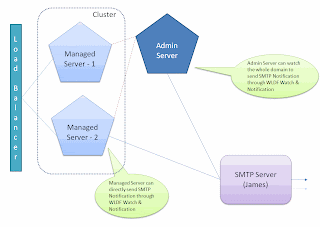
Figure: 1 WebLogic Domain


You can configure Watch conditions on the MBean data, Log messages and WLDF Event data. The notification can be one or more of the above notifications. Since email notification is a common request, I shall illustrate how to setup WLS to send email notification using an open source SMTP server - The Apache Java Enterprise Mail Server (Apache James). To download Apache James, go to - http://james.apache.org/server/ [or] http://people.apache.org/dist/james/server/binaries/. Download and extract the zip file to a convenient location (Eg. /usr/james-2.3.1rcl/). Start the server using run.sh from the bin folder under the JAMES_HOME. Setup a test user in James as per these instructions - http://james.apache.org/server/2.3.1/adding_users.html. The default admin username and password for James are root/root.

Ensure that the James mail server and the administration server for the domain are started. If not, use DOMAIN_HOME/startWebLogic.cmd/sh for starting the administration server of your domain and use JAMES_HOME/bin/run.bat/sh to start James Server. You can use console or WLST to configure the following setting. Let us use the web-based administration console for configuration. Log in to WebLogic Administration Console at - http://localhost:7001/console using an administrative account.

Creating JavaMail Session

First step is to make sure that the underlying resources for the notification are setup. In this case we are going to use SMTP notification so let us first create the Java Mail Session to connect to James Mail Server.

  1. Click "Lock & Edit" to acquire a configuration lock
  2. Expand Services > Mail Sessions and click "New" to create a new Java Mail Session.
  3. Provide Name, JNDI Name and JavaMail Properties as follow:
  4. Name - James-MailSession
  5. JNDI Name - com.test.myjamesMailSession
  6. JavaMail Properties:

mail.transport.protocol=smtp

mail.smtp.host=localhost

mail.smtp.user=admin

mail.smpt.password=password

  1. Click next to target the mail session to a server (Eg. AdminServer or mgd_s1) and click finish.
  2. Activate the changes by clicking "Activate Changes".


Figure: 2 Configuring JavaMail Session


If you are using a different mail server use appropriate information.

Creating WLDF Module

Next step in configuring watch and notification is to create a diagnostic module and target it to the server. You can use console or WLST to create a diagnostic module. The following steps illustrate the steps to create a WLDF system module:

  1. Click "Lock & Edit" to acquire a configuration lock
  2. Click Diagnostics > Diagnostics Modules and click "New" to create a new diagnostics module. Provide a name and description.
  3. Name - Test_WLDF_Module
  4. Description - This is a WLDF module for testing email notifications

  1. Select the newly created module and select targets tab. Select the appropriate server for target as before
  2. Click "Save" and "Activate"


Figure: 3 Configuring Diagnostic Module

Creating Watch & Notification

Each WebLogic Server instance can be configured with only one diagnostic module but you can target the same diagnostic module to multiple servers or clusters. Once the WLDF system module is created and targeted to the appropriate server then watches and notifications can be configured. The following steps illustrate how to create a Watch and a Notification.

To create a watch:

  1. Click "Lock & Edit" to acquire a configuration lock
  2. Navigate to the diagnostic module created above (Test_WLDF_Module) and select the "Watches and Notifications" tab and "Watches" sub-tab (if not already selected)
  3. Click "New" to create a new Watch. Provide the name and select the type as "Collected Metrics" [Select "Collected Metrics" for inspecting Runtime MBean values, "Server Log" to watch log data and "Event Data" to watch instrumented data]
  4. Name - Heap_Watch
  5. Watch Type - Collected Metrics
  6. Enable Watch - Selected
  7. Click "Next"
  8. Click "Add Expressions"
  9. Ensure that "ServerRuntime" is selected and click "Next"
  10. If you are running WebLogic Server on Java HotSpot VM, make sure "Select an MBean Type from the following list" is selected and select "weblogic.management.runtime.JVMRuntimeMBean" and click "Next". If you are using JRockit VM, make sure "Select an MBean Type from the following list" is selected and select "weblogic.management.runtime. JRockitRuntimeMBean" and click "Next".
  11. Select the instance for the appropriate server from the list for "Instance" and click "Next"
  12. For "Message Attribute" select "HeapFreePercent", "<" for "Operator" and type "85" for "Value". Click "Finish" twice to create a Watch
  13. Activate the changes


Figure: 4-a Configuring Watch


Figure: 4-b Configuring Watch


The above watch will trigger the configured notification if the percentage of free heap is less than 90. You could make complex rule expression by combining multiple attributes from different MBean. For now we haven't configured any notification for this watch. We will create the notification and will associate it to the watch in the following steps.

To create a notification:

  1. Click "Lock & Edit" to acquire a configuration lock
  2. Navigate to the diagnostic module created above and select the "Watches and Notifications" tab and "Notification" sub-tab
  3. Click "New" to create a new Notification
  4. Select "SMTP (E-Mail) for Type and click "Next"
  5. Provide a name - James_Email_Notification. Make sure the notification is enabled and click "Next".
  6. Configure the following properties for the "Config Notification - SMTP Properties" page
  7. Mail Session Name - James-MailSession
  8. E-Mail Recipients - admin@localhost

  1. Click "Finish".
  2. Activate the changes


Figure: 5-a Configuring SMTP Notification


Figure: 5-b Configuring SMTP Notification


To associate the watch and the notification:

  1. Click "Lock & Edit" to acquire a configuration lock
  2. Navigate to the diagnostic module created above (Test_WLDF_Module) and select the "Watches and Notifications" tab and "Watches" sub-tab (if not already selected)
  3. Select the watch you created earlier - Heap_Watch
  4. Select the "Notifications" tab and move the "James_Email_Notification" from Available to Chosen
  5. Click "Save"
  6. Select the "Alarms" tab and select "Use an automatic reset alarm". Set the "Automatic reset period" to 6 and click "Save". This will ensure that the notifications are at least 90 seconds apart.
  7. 5. Click "Activate Changes"

Figure: 6-a Associating Watch and Notification

Figure: 6-b Configuring Alarm

As we configured the watch type to be Collected Metrics, the attributes involved in the watch rule will be harvested and tested for watch rule expression(s). The default sampling period for the harvester is 300,000 milliseconds (or 5 minutes). So the time between samples will be 5 minutes. To change the sampling period for metrics collection:

  1. Click "Lock & Edit" to acquire a configuration lock
  2. Navigate to the diagnostic module created above (Test_WLDF_Module) and select the "Collected Metrics" tab
  3. Ensure that "Enabled' check-box is selected
  4. Change the "Sampling Period" as "120000" so that it will collect samples once every two minute


Figure: 7 Configuring Sampling Period


To receive the notifications sent by WebLogic Server as emails, install and configure an email client like Mozilla Thunderbird. The following is an example of the email received from WebLogic Server:

Using WLST

The configurations that are illustrated using Administration Console here can also be done using WLST. The following script is an example WLST script to configure a Javamail session, WLDF Module, Watch and Notification:


#Connect to the admin sever
connect('weblogic','Welcome1','t3://localhost:7001')

#Start a change session
edit()
startEdit()
cd('/')

#Create and configure a Javamail session
cmo.createMailSession('James-MailSession')
cd('/MailSessions/James-MailSession')
cmo.setJNDIName('com.test.myjamesMailSession')
cmo.setProperties({mail.smtp.user=user;, mail.smpt.password=password;, mail.smtp.host=localhost;, mail.transport.protocol=smtp;})
set('Targets',jarray.array([ObjectName('com.bea:Name=AdminServer,Type=Server')], ObjectName))

#Create and configure a WLDF Module
cd('/')
cmo.createWLDFSystemResource('Test_WLDF_Module')
cd('/SystemResources/Test_WLDF_Module')
cmo.setDescription('This is a WLDF module for testing email notifications.')
set('Targets',jarray.array([ObjectName('com.bea:Name=AdminServer,Type=Server')], ObjectName))

#Create and configure a WLDF Watch
cd('/WLDFSystemResources/Test_WLDF_Module/WLDFResource/Test_WLDF_Module/WatchNotification/Test_WLDF_Module')
cmo.createWatch('Heap_Watch')
cd('/WLDFSystemResources/Test_WLDF_Module/WLDFResource/Test_WLDF_Module/WatchNotification/Test_WLDF_Module/Watches/Heap_Watch')
cmo.setRuleType('Harvester')
cmo.setEnabled(true)
#For HotSpot VM
#cmo.setRuleExpression('(${ServerRuntime//[weblogic.management.runtime.JVMRuntimeMBean]com.bea:Name=AdminServer,ServerRuntime=AdminServer,Type=JVMRuntime//HeapFreePercent} < 85)')
#For JRockit VM
cmo.setRuleExpression('(${ServerRuntime//[weblogic.management.runtime.JRockitRuntimeMBean]com.bea:Name=AdminServer,ServerRuntime=AdminServer,Type=JRockitRuntimeMBean//HeapFreePercent} < 85)')
cmo.setAlarmType(None)

#Create and configure a WLDF SMTP Notification
cd('/WLDFSystemResources/Test_WLDF_Module/WLDFResource/Test_WLDF_Module/WatchNotification/Test_WLDF_Module')
cmo.createSMTPNotification('James_Email_Notification')
cd('/WLDFSystemResources/Test_WLDF_Module/WLDFResource/Test_WLDF_Module/WatchNotification/Test_WLDF_Module/SMTPNotifications/James_Email_Notification')
cmo.setEnabled(true)
cmo.setMailSessionJNDIName('com.test.myjamesMailSession')
set('Recipients',jarray.array([String('admin@localhost')], String))
cmo.setSubject(None)
cmo.setBody(None)

#Associate the watch and notification
cd('/WLDFSystemResources/Test_WLDF_Module/WLDFResource/Test_WLDF_Module/WatchNotification/Test_WLDF_Module/Watches/Heap_Watch')
set('Notifications',jarray.array([ObjectName('com.bea:Name=James_Email_Notification,Type=weblogic.diagnostics.descriptor.WLDFSMTPNotificationBean,Parent=[testdomain]/WLDFSystemResources[Test_WLDF_Module],Path=WLDFResource[Test_WLDF_Module]/WatchNotification[Test_WLDF_Module]/SMTPNotifications[James_Email_Notification]')], ObjectName))
cmo.setAlarmType('AutomaticReset')
cmo.setAlarmResetPeriod(60000)

#Set the sampling period
cd('/WLDFSystemResources/Test_WLDF_Module/WLDFResource/Test_WLDF_Module/Harvester/Test_WLDF_Module')
cmo.setSamplePeriod(120000)
cmo.setEnabled(true)

#Activate the changes
save()
activate()

#Exit
exit()

Thursday, July 1, 2010

Using WLST Script To List Messages From A JMS Queue

WebLogic Server added support for Runtime Message Management for Destination hosted on WebLogic JMS Servers in WLS 9.0. It will an exciting feature if you are currently in WLS 8.1 or new to WLS. Now you can administratively view and browse all messages, and manipulate most messages in a running JMS server, by using the Administration Console or WLS public runtime APIs. Once I start getting excited about this feature to customer the very next logical question from administrators are can I script this? The answer is obviously, Yes. Java or WLST is your answer. If you are a developer and there is a requirement to provide a Java/JEE application for your administrators or business users to view or browse the messages then Java will be your option. For administrators who are non-Java, there are MBeans like JMSDestinationRuntimeMBean and JMSDurableSubscriberRuntimeMBean that you can use from WLST to script any of the message managment features. Needless to say if there are existing Java implementation for message management then you can simply import and use them within WLST as well. But WLST scripts are natural choice for administrators.

So I started out writing a simple WLST script that can list all the messages from a given JMS Queue. The script is written to list all the headers and properties along with the body. I have made enough comments in the script to explain the different steps. But the high-level steps are:
  1. Connect to the server
  2. Get to the JMSDestinationRuntimeMBean
  3. Get the cursor to find the number of messages
  4. Get the messages without body to find the cursor and the Message ID
  5. Get the message with body using the Message ID
  6. Print the Headers, Properties and Body (or) Pay Load of the Message

A key information to note here is if you have any Object Messages in the Queue then those classes should be added to the Java Classpath before you execute this WLST Script. I haven't implemented any exception handling logic in my script whereas handling exceptions are best practices and you might want to refer to my other entries regarding that information.


#Import necessary classes/interfaces
from weblogic.jms.extensions import JMSMessageInfo
from javax.jms import TextMessage
from javax.jms import ObjectMessage

#Define constants
url='t3://localhost:7001'
username='weblogic'
password='weblogic1'
jmsservername='test-jms-server'
jmsmodulename='test-jms-module'
jmsdestname='test-queue'

#Connect
connect(username,password,url)

#Switch to the server runtime tree
serverRuntime()

#Navigate to the JMS Destination Runtime MBean
cd('JMSRuntime/' + serverName + '.jms/JMSServers/' + jmsservername)
cd('Destinations/' + jmsmodulename + '!' + jmsdestname)

#Get the cursor (JMSMessageCursorRuntimeMBean) to browse the messages - No selector & No time out
cursor = cmo.getMessages('',0)

#Determine the number of messages in the destination
cursorsize = cmo.getCursorSize(cursor)
print '------------------------------------------'
print 'Total Number of Messages -> ', cursorsize
print '------------------------------------------'

#Get all the messages as an array of javax.management.openmbean.CompositeData
messages = cmo.getNext(cursor, cursorsize)

#Loop through the array of messages to print
for message in messages:

#Create WebLogic JMSMessageInfo to get Message ID
jmsmsginfo = JMSMessageInfo(message)
wlmsg = jmsmsginfo.getMessage()
wlmsgid = wlmsg.getJMSMessageID()

#Get Message with body
fullcursormsg = cmo.getMessage(cursor,wlmsgid)
fulljmsmsginfo = JMSMessageInfo(fullcursormsg)
handle = fulljmsmsginfo.getHandle()
compdata = cmo.getMessage(cursor, handle)
msgwithbody = JMSMessageInfo(compdata)

#Print Key Message Headers
print 'Message ID - ' + msgwithbody.getMessage().getJMSMessageID()
print 'Message Priority -' , msgwithbody.getMessage().getJMSPriority()
if msgwithbody.getMessage().getJMSRedelivered() == 0:
redeliv = 'false'
else:
redeliv = 'true'
print 'Message Redelivered - ' + redeliv
print 'Message TimeStamp -' , msgwithbody.getMessage().getJMSTimestamp()
print 'Message DeliveryMode -' , msgwithbody.getMessage().getJMSDeliveryMode()

#Print Message Properties
prop_enum = msgwithbody.getMessage().getPropertyNames()
print ' '
print 'Message Properties :'
print ' '
for prop in prop_enum:
print prop + ' - > ' + msgwithbody.getMessage().getStringProperty(prop)

#Print Message Body
fullwlmsg = fulljmsmsginfo.getMessage()
print ' '
print 'Message Body :'
print ' '
if isinstance(fullwlmsg, TextMessage):
print fullwlmsg.getText()
else:
if isinstance(fullwlmsg, ObjectMessage):
print fullwlmsg.getObject()
else:
print '***Not a Text or Object Message***'
print fullwlmsg.toString()
print ' '
print '--------------------------------------------------------------'
print ' '

#Close cursor as No Time Out specified - Best practice
cmo.closeCursor(cursor)

#Disconnect & Exit
disconnect()
exit()

Wednesday, June 16, 2010

Running OS Commands From WLST


If you spend a lot of time with WLST in the interactive mode, I am sure you have opened another command prompt/shell to check something at the OS file system level. If you wonder whether can execute an OS command from within WLST prompt, the answer is "Yes". This is very convenient similar to how you can execute OS commands from within "Vi" editor.

In fact this feature is not from WLST but from underlying Jython. There is "os" module in Jython that provides a unified interface to a number of operating system functions. There is "system" function in the "os" module that can take a OS command as a string input and returns either "0" or "1" depends on whether the command was successful or failed. So this feature can also be used with scripting mode where the return code can be verified for further processing in the script.

For eg. os.system(r'dir c:\bea') can list the contents of the bea folder under c drive. Notice the use of the preceding 'r' for escaping the entire string.

Friday, February 26, 2010

HTTP Session Monitoring in WebLogic Server

Monitoring HTTP sessions on WebLogic Server is a common task when you have web component (WAR) deployed as a part of your enterprise application (EAR). By default WebLogic Server provides a way to access the number of active HTTP sessions for each web application. But if you need more information about the individual sessions like their creation time, last accessed time, maximum inactive interval etc. then you have to enable the session monitoring option in the web component's Deployment Descriptor (DD). If the application is already packaged and deployed you can make use of the deployment plan to enable this attribute. WebLogic Administration Console provide options to modify some of the attribute for the components and application through the interface. Eventually a deployment plan will be generated if there are no deployment plan associated with the application or the existing plan will be modified automatically by Administration Console. This will ease administrators job of enabling session monitoring for a packaged application. You may have to update or redeploy the application with the plan for the monitoring to take effect. No restarting of any server is required for this change.

Administration Console will automatically populate the Session tab under the Monitoring tab with the individual session information for the specific application. By default the following column are displayed on the console page:

  • Context Root
  • Server
  • Creation Time
  • Time Last Accessed
  • Max Inactive Interval

You can also add the following columns to the table by customizing the view:

  • Monitoring ID
  • Application
  • Machine

The Monitoring ID provides a unique ID by default to identify the session. You can also customize the Monitoring ID by specifying a session attribute name which is unique for identifying the session for users. For example you can configure customer_id or user_id or order_id as Monitoring ID for tracking session. I shall talk about Monitoring IDs and finding session size in a different post. Internally WebLogic will concatenate the Monitoring ID with the creation time to make a unique name for each session. The following is an example screen shot of monitoring sessions after customizing the view:


WLST can also be able to retrieve these information from the ServletSessionRuntimeMBeans. The following is an example WLST script to connect to the Administration Server of a domain to retrieve session information for a specific application on a particular server.I had used the deprecated ServletSessionRuntimeMBeans in my WLST example as the session creation time is only available through that runtime mbean. You can also access all the information about the session except the creation time through the WebAppComponentRuntimeMBean. But you will have to use the Monitoring IDs (available through WebAppComponentRuntimeMBean) to get information about a specific session.


from java.util import Calendar

def defineVariables()
#Define all the variables used
username='system'
password='weblogic'
adminurl='t3://localhost:7001'
servername='AdminServer'
appname='CompanyStore'

def connectToAdminServer()
#Connect to Admin Server
connect(username,password,adminurl)

def extractAndPrintSessionInfo(servletSessionRuntime)
#Get session name
session_name=ssession.getName().split('!')[0]
#Creation time is concatinated to the session name. So split it
ct_millis=ssession.getName().split('!')[1]
cal = Calendar.getInstance()
cal.setTimeInMillis(Long(ct_millis))
ct = cal.getTime()
#Get last accessed time
tla_millis=ssession.getTimeLastAccessed()
cal.setTimeInMillis(Long(tla_millis))
tla = cal.getTime()
print ' '
print 'Session Name - ' + session_name
print 'Creation Time - ', ct
print 'Last Accessed Time - ', tla

#Main
defineVariables()
connectToAdminServer()

#Get Runtime for our server
domainRuntime()
cd('/ServerRuntimes/'+servername)

#Get all running applications
apps=cmo.getApplicationRuntimes()
for app in apps:

#We are intersted only on this application
if app.getName() == appname:

print 'Application Name - ', app.getName()

#Get all components in that application
comps=app.getComponentRuntimes()
for comp in comps:

#We are interested in only web components
if comp.getType() == 'WebAppComponentRuntime':
comp_name = comp.getName().split(servername+'_/')
if len(comp_name) == 1:
display_comp_name = '(default web app)'
else:
display_comp_name = comp_name
print 'Component Context Root - ', display_comp_name

#Get all active sessions
sessions=comp.getServletSessions()
print 'Total no. of sessions - ', len(sessions)

#Loop through all the available sessions
for ssession in sessions:
extractAndPrintSessionInfo(session)

#Disconnect and exit
disconnect()
exit()


The output from the above script will look something like this:


[test@mywlssvr-orcl ~]$ java weblogic.WLST sessions.py

Initializing WebLogic Scripting Tool (WLST) ...

Welcome to WebLogic Server Administration Scripting Shell

Type help() for help on available commands

Connecting to t3://localhost:7001 with userid system ...
Successfully connected to Admin Server 'AdminServer' that belongs to domain 'dizzyworld'.

Warning: An insecure protocol was used to connect to the
server. To ensure on-the-wire security, the SSL port or
Admin port should be used instead.

Location changed to domainRuntime tree. This is a read-only tree with DomainMBean as the root.
For more help, use help(domainRuntime)

Application Name - CompanyStore
Component Context Root - (default web app)
Total no. of sessions - 2

Session Name - dYvLLHgRGxQ8zS0ZYySLZKx1j2KK9Ws2G22nlJXvrQRFv64zsPTm
Creation Time - Fri Feb 26 01:13:21 UTC 2010
Last Accessed Time - Fri Feb 26 01:13:26 UTC 2010

Session Name - nGbTLHgFLnfNjwGT1cpHGQhJZGZynBYRsp2TjC8kC7KFRK1vCCf3
Creation Time - Fri Feb 26 01:13:41 UTC 2010
Last Accessed Time - Fri Feb 26 01:13:45 UTC 2010
Disconnected from weblogic server: AdminServer


Exiting WebLogic Scripting Tool.

Wednesday, November 25, 2009

Understanding WLST built-in variables . . .[WLST scripting Best Practices (Part-5)]

This post is a continuation of my previous post - in a series of posts about WLST scripting best practices.

Managed Beans (MBeans) are used to represent all the configuration and runtime information about WebLogic Domain, Servers, the applications and services deployed on a WebLogic Server Domain. While you can get all the information from WebLogic MBeans, WLST simplifies the task of building scripts by providing some built-in variables. These WLST variables are initialized and/or modified when you change to online mode (connect to a server), start an edit session etc. to appropriate values.

One of the very useful WLST variable is cmo. cmo stands for current management object. When navigating in WLST you can use cmo to reference the current MBean (object) instance you are navigating into. The cmo value is changed when you navigate to different hierarchy of MBeans under different MBean trees in WebLogic (except jndi tree). The following illustrates the use of cmo.


...
connect(username, password, url)
edit()
startEdit()
cd('/Servers/server1')
s1=cmo
cd('/Servers/server2')
s2=cmo
print 'Listenport of server1 -> ' + s1.getListenPort()
print 'Listenport of server2 -> ' + s2.getListenPort()
...


Notice the use of cmo can for invoking operations on the respective MBean object. There are many such variables that will help you to write better and efficient WLST scripts. See here for the list of all the WLST variables.

If you know a variable name you can simply use it in you script. dumpVariables() command can be used to list all the variables and their values.


wls:/testdomain/serverConfig> dumpVariables()
adminHome weblogic.rmi.internal.BasicRemoteRef - hostID: '328889774891021637S:127.0.0.1:[7001,7001,-1,-1,-1,-1,-1]:testdomain:AdminServer',oid: '259', channel: 'null'
cmgr [MBeanServerInvocationHandler]com.bea:Name=ConfigurationManager,Type=weblogic.management.mbeanservers.edit.ConfigurationManagerMBean
cmo [MBeanServerInvocationHandler]com.bea:Name=testdomain,Type=Domain
connected true
domainName testdomain
...


In addition you should also be aware of these WLST variables in order to NOT use them to store your own information. If you do so then WLST will overwrite these variables during your interaction like connect, startEdit etc. So make sure you understand these WLST variables, use them in your scripts and do not use them to store your information.

Thursday, October 22, 2009

More ways to check the existense of a resource with WLST

In one of my previous post, I discussed a couple of ways with which you can find out whether a particular configuration already exists before you create them. The methods are not just limited to the one on that post. So now I am here to discuss couple more way to do the same check. But just for completeness I shall also include the methods I discussed in my previous post. I am taking a sample use case to check whether a particular WebLogic Server instance exists in the domain or not. But you can extrapolate these technique for any other resource like JDBC Data Source, JMS Server, JMS Queue etc.

Goal - Check whether a server with the name 'mymanagedserver' exists in the domain

Method-1 Using "cd"

A simple approach is to use the "cd" command to navigate into that configuration MBean. If the "cd" command throws an exception then you can safely assume that the resource/configuration doesn't exists and you can continue with your task.


...
mgdServerName = 'mymanagedserver'
### Checking for the server
try:
cd('/Servers/' + mgdServerName)
print '===> Server \"' +mgdServerName+'\" already exists'
print '===> No action was performed'
exit()
except:
pass
### Continue to create the server
...


Method-2 Catch "BeanAlreadyExistsException"

Another approach is to catch the "BeanAlreadyExistsException" when creating the resource and safely exiting the script.


...
mgdServerName = 'mymanagedserver'
### Create the Managed Server
edit()
startEdit()
try:
create(mgdServerName, resourceType)
print '===> Created Managed Server - ' + mgdServerName
pass
except BeanAlreadyExistsException:
print '===> Server \"' +mgdServerName+'\" already exists'
print '===> No action was performed'
cancelEdit('y')
exit()
...


But with this approach you are starting an edit session and creating the server to find out it's existence. So you have to cancel the edit session once you find out that the resource that you are creating already exists if not you might get a warning message similar to the following:

You have an edit session open and you will lose all outstanding changes and your edit session will be stopped if you exit. Are you sure you would like to exit? (y/n)

So canceling the edit session with a response 'y' will make WLST not to prompt for the user response.


Method-3
Using "getMBean"

There is a WLST command called getMBean which will return the MBean object when you specify the appropriate path. If the instance is not found then it will return None. But getMBean command does not throw an exception when an instance is not found. So you have explicitly check result of the getMBean.


...
mgdServerName = 'mymanagedserver'
ref = getMBean('/Servers/' + mgdServerName)
if(ref != None):
print 'Server ' + servername + 'already exists'
disconnect()
exit()
else:
pass
### Continue to create the server
...


Method-4 Using "ls"

You can simply navigate to the resource type and execute ls. This will return the list of all the instances as a string when you assign the output to a variable. Then you can use the find method on that string variable to check whether your server exists. The find method returns a "0" on success or "-1" on failure.


...
mgdServerName = 'mymanagedserver'
cd('/Servers')
servers = ls()
if (servers.find(servername) != -1):
print 'Server ' + servername + ' already exists'
disconnect()
exit()
else:
pass
### Continue to create the server
...

Monday, June 1, 2009

Use definitions for Reuse [WLST scripting Best Practices (Part-4)]

This post is a continuation of my previous post - in a series of posts about WLST scripting best practices. When you are authoring WLST scripts for automating WebLogic administration tasks, you can reuse or extend an existing logic written in WLST or Jython scripts. You can also leverage or extend logic written in Java which I will discuss later in a different post. Definition are reusable code blocks in Jython. Think of definitions as methods or functions. You can pass parameters into definitions. You can reuse definitions from the same script or from a different script. A script that contains definitions for other scripts to use is usually called as a 'Module'. If you are using a definition from a module then you should import it in your script. The definition should be defined before they get called in the script.

Let us see an example of a using definition in the same script.


#Definition for connecting to a server
def connectToServer():
username = 'weblogic'
password = 'weblogic'
url = 't3://egAdm:7001'
connect(username, password, url)

#Definition to print a running servers heap details
def printHeapDetails(server_name):
domainRuntime()
cd('/')
cd('ServerRuntimes/'+server_name+'/JVMRuntime/'+server_name)
hf = float(get('HeapFreeCurrent'))/1024
hs = float(get('HeapSizeCurrent'))/1024
hf = hf/1024
hs = hs/1024
print 'HeapFreeCurrent - ' + `hf` + 'MB'
print 'HeapSizeCurrent - ' + `hs` + 'MB'

#Definition to disconnect from a server
def disconnectFromServer():
disconnect()
exit()

#Calling connectToServer definition with no arguments
connectToServer()

#Calling printHeapDetails with arguments
printHeapDetails('AdminServer')
printHeapDetails('mgds1')
printHeapDetails('mgds2')

#Calling disconnectFromServer definition with no arguments
disconnectFromServer()


In the above script we are connecting to the administration server of a domain and then printing the heap details for the admin server and 2 other managed servers. The logic to navigate to the respective runtime mbean and printing the heap related attributes is being defined as reusable definition and called multiple times.

WLST-BP-4 Use definitions for Reuse

Monday, March 23, 2009

Reading csv File in WLST Script

One of the comment for an earlier post was about creating domain(s) from csv file with WLST. Creating domain using WLST is a fairly simple and straight forward process. So I decided to explain the simple concept of reading a csv file and creating a domain using an example.

The main trick is to use the Jython language libraries to perform some of the required operations. In my example I shall illustrate how to read command-line arguments, open and read files using Jython. I am also using some local function definitions to create some modular script here. The following is an example of a comma seperated value file that our WLST script can read to create one or more domains:


#domainName,domainLocation,adminUser,adminPassword,adminServerAddress,adminServerPort
testDomain,/home/oracle/domains,system,weblogic,localhost,8998
anotherDomain,/home/oracle/domains,system,weblogic,localhost,7887


Comment lines start with # and each line that is not a comment line represent values for a domain such as domain name, location etc. The script to read the csv file and create the domain can be something like this:


### Script to create WebLogic Domain(s) from csv file
### Reusable Definitions
def buildDomain():
### Read Basic Template
readTemplate(WL_HOME+"/common/templates/domains/wls.jar")
cd('Servers/AdminServer')
set('ListenAddress', adminServerAddress)
set('ListenPort', int(adminServerPort))

### Create Admin User
cd('/')
cd('Security/base_domain/User')
delete('weblogic','User')
create(adminUser,'User')
cd(adminUser)
set('Password',adminPassword)
set('IsDefaultAdmin',1)

### Write Domain
setOption('OverwriteDomain', 'true')
writeDomain(domainLocation+'/'+domainName)
closeTemplate()

def printConfirmation():
### Print Confirmation
print ""
print "Created Domain With Following Values"
print "Domain Name = %s " % domainName
print "Domain Location = %s " % domainLocation
print "Admin User = %s " % adminUser
print "Admin Password = %s " % adminPassword
print "Admin Server Address = %s " % adminServerAddress
print "Admin Server port = %s " % adminServerPort

### Executable Script
### CreateDomain.py
import sys

### Define constants
WL_HOME = "/products/beaSB/wlserver_10.0"

### Read the command-line arguments
argslength = len(sys.argv)
if argslength < 2 :
print '==>Insufficient arguments'
print '==>Syntax: java weblogic.WLST CreateDomain.py csv.file'
exit()
else:
### Read the csv file
fileName = sys.argv[1]
print('Reading File \"' + fileName + '\"' )
f = open(fileName)
try:
for line in f.readlines():
### Strip the comment lines
if line.strip().startswith('#'):
continue
else:
### Split the comma seperated values
items = line.split(',')
items = [item.strip() for item in items]
if len(items) != 6:
print "==>Bad line: %s" % line
print "==>Syntax: domainName, domainLocation, adminUser, adminPassword, adminServerAddress, adminServerPort"
else:
(domainName, domainLocation, adminUser, adminPassword, adminServerAddress, adminServerPort) = items

### Call the definition buildDomain
buildDomain()

### Call the definition printConfirmation
printConfirmation()

except Exception, e:
print "==>Error Occured"
print e
exit()


The executable part of the script is something that is not marked as a definition and in this case it start with the import statement. Any command-line or program arguments passed to WLST are available through sys.argv array. The array is zero indexed and the first element of the array sys.argv[0] is the script file itself. In our script we check to make sure that atleast 2 arguments including the script filename exists.


...
### Read the command-line arguments
argslength = len(sys.argv)
if argslength < 2 :
print '==>Insufficient arguments'
print '==>Syntax: java weblogic.WLST CreateDomain.py csv.file'
exit()
else:
...


Built-in functions are then used to open and read the csv file.


...
f = open(fileName)
try:
for line in f.readlines():
...


We are Using the startswith to eliminate the comment lines and then using the split and strip string function to create a list of all the items passed from the command-line. Later after checking the number of values in each line the list is assigned to a tuple of variable names (tuple is immutable in Jython where as Lists are mutable).


(domainName, domainLocation, adminUser, adminPassword, adminServerAddress, adminServerPort) = items


Once we have all values read and stored in the respective variables then it is pretty straight forward to create a domain which in this case was built as function definition (buildDomain). Later all the values were sent to standard output for user's attention. Also any exception will be reported with the try...except block.

Monday, March 2, 2009

Check for resource/configuration existence [WLST scripting Best Practices (Part-3)]

This post is a continuation of my previous post in a series of posts about WLST scripting best practices. When you are authoring WLST scripts to create new resource/configuration in WebLogic domain then check for its existence. If the resource/configuration already exists then you might get an error similar to the following:

weblogic.descriptor.BeanAlreadyExistsException: Bean already exists

A simple approach is to use the "cd" command to navigate into that configuration MBean. If the "cd" command throws an exception then you can safely assume that the resource/configuration doesn't exists and you can continue creating.

...
### Check for the server
try:
cd('/Servers/' + mgdServerName)
print '===> Server \"' +mgdServerName+'\" already exists'
print '===> No action was performed'
exit()
except:
pass
...


The other approach is to catch the "BeanAlreadyExistsException" while creating the resource and safely exiting the script.


...
### Create the Managed Server
edit()
startEdit()
try:
create(mgdServerName, resourceType)
print '===> Created Managed Server - ' + mgdServerName
pass
except BeanAlreadyExistsException:
print '===> Server \"' +mgdServerName+'\" already exists'
print '===> No action was performed'
cancelEdit('y')
exit()
...

But with this approach you are starting an edit session and creating the server to find out it's existence. So you have to cancel the edit session once you find out that the resource that you are creating already exists if not you might get a warning message similar to the following:

You have an edit session open and you will lose all outstanding changes and your edit session will be stopped if you exit. Are you sure you would like to exit? (y/n)

So cancelling the edit session with a responce 'y' will make WLST not to prompt for user response. I shall discuss how to streamline the outputs from WLST and redirect them to an output file or log file in a later post.

WLST-BP-3 Check for the resource or configuration existence before creating them

Thursday, February 26, 2009

Do Not Step On Other's Feet [WLST scripting Best Practices (Part-2)]

This post is a continuation of my previous post - in a series of posts about WLST scripting best practices. When using WLST script for performing configuration changes always check whether someone else is making changes. WebLogic support configuration changes using many methods but not limited to:
  • Administration Console
  • Interactive WLST
  • WLST SCripts
  • JMX
  • Ant Scripts
  • 3rd Party Tools
So it is always better to check whether someone else is making changes while you are ready to start a change session. WebLogic Server will allow only one change session at a time no matter which one of the above methods you use for configuration management. Especially environments with multiple administrators the best practice is to have individual logins for each administrator so that you can have more controlled environment. If you are interested in configuration auditing to find out who is responsible for what, see this post.

Use the Configuration Manager to find out information about existing change sessions. You can find out whether someone else had already started a change session, if so who is making changes, are there any unactivated changed, if so what changes are unactivated etc. from the configuration manager. The following example illustrates a code snippet which checks for existing sessions using configuration manager:


...
### Get the Configuration Manager and check for existing session
cfgManager = getConfigManager()
try:
cfgManager.getChanges()
print '===> Someone else is making changes'
except:
print '===> No one else is making changes'
...


The following example illustrates a code snippet which checks for the number of unactivated changes using configuration manager:


...
### Get the Configuration Manager and check for existing session
cfgManager = getConfigManager()
try:
cfgManager.getChanges()
print '===> Someone else is making changes'
noOfChanges = cfgManager.getUnactivatedChanges().__len__()
print 'There are ' + noOfChanges + ' unactivated pending changes in the current edit session'
except:
print '===> No one else is making changes'
...

The above code snippet may work only if you are the user who is making the changes. The following example illustrates a code snippet which checks and prints the user who is currently making changes using configuration manager:


...
### Get the Configuration Manager and check for existing session
cfgManager = getConfigManager()
try:
cfgManager.getChanges()
print '===> User ' + configmanager.getCurrentEditor() + ' is making changes'
except:
print '===> No one else is making changes'
...


The following example is a complete script which checks for an existing session and if one doesn't exists then it will create a new managed server by starting a new session. If a session already exists then it will simply display that information and will exit.


from weblogic.management.mbeanservers.edit import NotEditorException

### CreateMgdServer.py
### Define all the requried variable
username = 'braman'
password = 'weblogic'
url = 't3://localhost:7001'
mgdServerName = 'mgdserver1'
resourceType = 'Server'
listenAddress = 'egmgd1'
listenPort = 2001

### Connect to the Administration Server
connect(username, password, url)

### Get the Configuration Manager
cfgManager = getConfigManager()
try:
cfgManager.getChanges()
print '===> Currently there is a Session'
if cfgManager.isEditor() == true:
### You are making changes!!!
print '===> Looks like you started that session'
print '===> You can check the console for any pending changes'
print '===> Try rerunning this script after you release or commit the pending changes'
exit()

except NotEditorException, e:
if cfgManager.getCurrentEditor() is None:
### No session
pass
else:
### Someone else is making changes
userWithSession = cfgManager.getCurrentEditor().replace(' ', '')
print '===> Currently there is a Session'
print '===> User \"' +userWithSession+'\" is making the changes'
print '===> Wait until \"' +userWithSession+'\" complete the current session'
exit()
pass
except Exception:
### Other Errors
print '===> Error, see log for more info'
exit()


### Start a change session
edit()
startEdit()

### Create the Managed Server
create(mgdServerName, resourceType)
cd('/Servers/' + mgdServerName)
cmo.setListenPort(listenPort)
cmo.setListenAddress(listenAddress)
print '===> Created Managed Server - ' + mgdServerName

### Activate the changes
save()
activate()

### Disconnect from the Administration Server
disconnect()
exit()

To explain some tricky parts of the above script:

This is line of code is used to import the exception class
from weblogic.management.mbeanservers.edit import NotEditorException

To check whether you are holding on to a session currently you can use the following method on the configuration manager
cfgManager.isEditor()

To get the user who is currently making changes you use the getCurrentEditor method on the configuration manager
cfgManager.getCurrentEditor()

To get rid of all the white spaces you can use a replace method from the string class (this is Jython)
userWithSession = cfgManager.getCurrentEditor().replace(' ', '')


The above example works if you don't have a managed server named egmdg1. But if you already have a managed server in your domain with the same name then the script will fail with the following error:

weblogic.descriptor.BeanAlreadyExistsException: Bean already exists

You can handle that situation in couple of different ways. I shall continue on how to tackle that in my next post.

WLST-BP-2 Check for existing session before you start one

Wednesday, February 25, 2009

Variable Definitions In The Preamble [WLST scripting Best Practices (Part-1)]

With WLST becoming popular among WebLogic Administrator, there is an unsaid need to discuss the best practices with respect to WLST scripting. I am being asked to share information about WLST like an introductory/101 post. But I decided to start a series of post which might help WebLogic Administrators with some of the must follow best practices rather than writing some introductory post which might duplicate the documentation. For WLST documentation see here.

The common steps involved in a WLST script that is used to configure WebLogic Server are as follows:

1. Connect to server
2. Navigate to the respective location (MBean)
3. Modify the required properties
4. If more configuration needs to be modified continue Step-2
5. Else disconnect
6. Exit

The first of the series of best practices in authoring a WLST script is to define all the required variables at the beginning before connecting to the server. That way if any modifications must be done in the future it will be as easy as changing the variables defined at the beginning of the script. In the coming posts, I will talk about more of other best practices like writing a reusable WLST script, consuming information from the environment variables, exception handling, defensive scripting, avoiding to hard code critical information like username, password, url etc.

The usual variables are the username, password, url, resource names, attribute values etc. The following is an example of a script that defines all the required values as script variables which can avoid hardcoding and will also facilitate simple way to modify them in the future if required.


#CreateServer.py
#Define all the requried variable
username = 'system'
password = 'weblogic'
url = 't3://egAdm:7001'
serverName = 'mgdserver1'
listenAddress = 'egmgd1'
listenPort = '2001'

#Connect to the Administration Server
connect(username, password, url)

#Start a change session
edit()
startEdit()

#Create the Managed Server
create(serverName, 'Server')
cd('/Servers/' + serverName')
cmo.setListenPort(listenPort)
cmo.setListenAddress(listenAddress)

#Activate the changes
save()
activate()

#Disconnect from the Administration Server
disconnect()
exit()


The above script may not be authored using all the best practices now. But I will eventually build on the same example of creating a new Managed Server in my subsequent posts to address the other best practices as well. My next post will talk about how to check for existing change session before you start one with WLST.

WLST-BP-1 Define all the variables in the preamble

Wednesday, December 17, 2008

Easy Syntax with WLST

WLST is a powerful scripting solution for managing and administering WebLogic Server and resources deployed on them. WLST is built on the Java implementation of the scripting language Python called as Jython. All the commands in WLST are implemented as Jython functions and they require a set of parentheses for passing any arguments. Even any commands that do not require any arguments are supposed to be suffixed with parentheses. For example the command "ls" is used to list all the child MBeans and/or attributes of the current MBean you are at.

ls() - lists all the child MBeans and attributes
ls('a') - lists all the attribute names and values only
ls('c') - lists all the child MBeans only

So even if you want to invoke "ls" with no arugments you must use "ls()". This might not be an issue when you are building scripts that you might want to run many times. But while connected to a server and working with WLST in interactive mode, it might get a little frustated to type the parentheses everytime you want to run some simple commands with no arguments. To ease this pain there is a hidden option in WLST which can be used to ease the syntax for WLST commands - easeSyntax().


You can supply the "easeSyntax()" command to ease the syntax but this is not recommended for script mode and especially when using loop constructs. You can also use the regular Jython syntax with parentheses even after you enabled the easy syntax. To turn off the easy syntax mode simply issue the command again "easeSyntax".

Bye Bye parentheses!

Wednesday, September 24, 2008

Encrypt the credentials when running WLST in interactive or script mode

One of the common request I hear from administrators is that they want to get away from providing user name and password in plain text when using WLST. WebLogic Server provides a way to encrypt the credentials for server start up. You can create a password file "boot.properties" (called as Boot Identity File) with plain text credentials in a folder named security under the server root directory. This file will be automatically detected during the server start up and the server will encrypt the information in this file for subsequent use. Until WebLogic Server 9.x this file should be placed under the DOMAIN folder. So servers sharing the same file system share the same boot identity file and cannot be configured to use different files.

This boot identity file can also be used by WLST only when started from the domain folder. This is mainly because the domain's password key (SerializedSystemIni.dat) is used to encrypt this file. If you are using WLST from a different location or from a remote machine to connect to the server or if you want to run WLST script you can use a different technique. You can use WLST to generate a User Configuration file which will have encrypted user name and password using storeUserConfig() command. A key file that will be used to encrypt the data will also get generated along with the user config file. The key file is important as it is required to decrypt the values back from the user config file. This is an online WLST command. So you should be connected to a running WebLogic Server or a Node Manager to issue this command.

When you use this command with no arguments the user configuration file for the current user will be generated within the current OS user's home folder.


wls:/testdomain/serverConfig>storeUserConfig()


You can also specify the location and name for the key file and the userconfig file if you want them to be created elsewhere.

wls:/testdomain/serverConfig>storeUserConfig('/usr/home/user1/configfile.secure', '/usr/home/user1/keyfile.secure')


If the files are stored with the default name (osusername-WebLogicConfig.properties & osusername-WebLogicKey.properties) you can simply connect without specifying the username and password in the connect() command.

wls:/offline> connect(url='t3://host:port')


If the files are stored in a different location or with a different name, then they can be passed as an argument to the connect() command.

wls:/offline> connect(userConfigFile='/usr/home/user1/configfile.secure', userKeyFile='/usr/home/user1/keyfile.secure', url='t3://host:port')


No more plain text user name and password in when using WLST. Have a safe and secure scripting!

Thursday, August 28, 2008

Add your own commands to WLST

Do you want to add your own commands to the already rich set of WLST commands?

You can do so by building your own *.py file and adding them to WL_HOME/common/wlst/lib folder. Any *.py file added to this folder will be automatically compiled and imported by WLST when started on that machine. So the custom commands built as definitions inside these modules can be used by calling them on the respective module names.

If you have a TestLib.py stored under WL_HOME/common/wlst/lib folder:

TestLib.py
----------
def testCmd():
print 'This is a test command'


And if there is a definition called testCmd() defined in it then you can call it as follows:

wls:/offline>TestLib.testCmd()

What you waiting for? Go and add you command to WLST now.

Tuesday, July 17, 2007

Scripting & Automation

Administrators always love scripting solutions. Because it is reusable and it can be executed by anyone. However it is not so easy to learn any scripting solution per se. A good example is UNIX shell scripting, where you must know the commands to build a scripting solution. But once you get ramped up it very simple to build a script.

WebLogic Server(WLS) provides many ways for an administrator to script different configuration and management tasks. Needless to say if the administrators are also Java developers they can use the management API used by WLS (JMX) for building such scripting solutions. If you are not a developer you don't have to panic you have other alternates that you can use.

If you are in WLS 8.1 or lower you can use anyone of the following solutions for scripting
  • Weblogic.Admin utility
  • WebLogic Ant tasks
  • WebLogic Scripting Tool (WLST)
  • Thirt-party solutions (WLShell etc.)

If you are in WLS 9.x or higher you still have all the above options but the Weblogic.Admin utility is deprecated and WLST is the recommended solution. But Weblogic.Admin is still for backward compatibility reasons.

But one of the challenge is for the administrator to ramp up on such scripting solutions provided by different vendors. WLS 10 solve that problem by providing a management plug-in to the light weight web-based UI (Administration Console) - WLST Script Generator. Using this you can record all your console interactions (Configurations) into a reusable WLST Script. It is like a little macro recorder that will solve your problem or ramping up on WLST if you are new to it.

The Administration Console does not record WLST commands for the following:

  • Changes to the security data that is maintained by a security provider. For example, it doesn't record the commands if you add or remove users.
  • Changes that are made to the application using console which will end up in deployment plans.
  • Runtime operations that you perform on Control or Monitoring pages, such as starting servers, suspending a JDBC Connection Pool etc.
To read more about WLST go here.
To read more about recording WLST Scripts go here.

I shall share more tips on WLST in my later posts.


View Balamurali Kothandaraman's profile on LinkedIn