Wednesday, May 29, 2013

Liferay Within a Day or Two!

In this modern, fast world it is not practical for anyone to read through a book for months to learn something new. The fact that someone is looking to read up on Liferay is not because they are bored but because there is need to learn Liferay Portal to get on a project or for a potential job opportunity. Liferay Portal 6 Starter is the book you need if you want to get started with Liferay within a day or two.

This is definitely a newbie guide. So you are not expected to know anything about Liferay. This will take you from zero knowledge to an extent that you can start playing and exploring the features of Liferay. Sandeep Nair, the author of this book distills the Top-5 feature of Liferay you must know out of the zillion features the product documentation will teach you. For me this was a book that I finished during my commute time as this is 54 pages cover to cover.

Here are the Top-5 features that you must know about Liferay according to Sandeep in this newbie guide to Liferay:

  1. Content management and workflow
  2. Document management
  3. Collaboration
  4. OpenSocial gadgets
  5. Dynamic Data Lists
Beyond the explanation to these features instructions are also provided to download the product and play with these features. This will help you to get started with Liferay practically than just reading about it. The author will induce your taste buds so that you will start playing around with Liferay when you get started with the instructions in this book to download and work with the features.

Another interesting information I found in this book was the links to some of the useful blogs. With Google all the information on the internet is in your finger tips. But the challenge is to filter the results and end up in useful website. The author provide links to interesting blogs and podcast about Liferay so that the readers are really motivated to learn beyond what is in the book.

Personally I ended up reading a huge beginners guide and then a book for developers when I wanted to learn about Liferay. Had I picked up this book couple of year ago then it would have been a more natural learning curve for me. Still I enjoyed this book and learned new things. If you are newbie to Liferay this is definitely a book that you must start your Liferay journey with.

Thursday, May 17, 2012

Liferay Portal Systems Development - Another Book!


Now that I got introduced to Liferay, its features and how to set it up on WebLogic Server, I wanted to learn more about the strengths of Liferay in detail. So I picked this book for my reading - Liferay Portal Systems Development. You can get an electronic copy of the book here. If you are a beginner to Liferay or you are an initial learner then you should look at my other post - Liferay Beginner's Guide.

This book is for you if you want to get serious about development with Liferay. Once you get to know the portal as user from outside the next step is to get your hands wet and dirty. This is more like opening your automobile's hood. This book explains all about the under-the-hood implementation and customization. You should be Java developer to get more benefits out of this book. But prior Liferay knowledge is not necessary.

This book clearly explains 3 different levels of development and takes you down that path.

  •  Level-I is where you will develop portlets, themes, layouts, hooks etc. At this level you are using Liferay Plugins SDK. 
  • Level-II is for advanced developers which requires you to change config files, write custom Java code, custom JSP files etc. 
  • Level-III is for more advanced developers which involves changing Liferay Portal source code. And this is the level for you if you wish to contribute to the Liferay Portal core development.
 If you want to build custom portlets, MVC portlet bridge and its extension are the gist of portlet development in Liferay. Once you build your portlet using SDK the process of deployment, configuration, using service builder to build services and models for your MVC portlet are all explained by the author in detailed steps with a sample close to realworld project in this book.

The most interesting aspect for me in this book are Hooks. Hooks are hot deployable functionalities that can let you override the portal core functionality. You can perform actions on portal startup, user login, overriding portal services, servlet filter mapping, servlet filters etc. Along with Hooks you will also learn about Ext Plugin which are used to modify the behaviour of internal out-of-the-box portlets that are distributed with Liferay to customized them for your needs. These 2 powerful features provide flexibility and customizing ability for the Liferay Portal.

One of the notorious feature of Liferay portals is the Enterprise and Web Content Management (ECM) which provides the ability to organize, store and render enterprise contents such as images, documents, organizational official business records etc. In my experience most of the organizations have their standard content management systems and would prefer to integrate their portal to existing ECMs like Documentum, Sharepoint, Alfresco etc. Author explains how to create contents, configure and use the them in Portal and integrate Liferay with exsiting ECMs. Along with the content management features the Open Social API, Social Office provides powerful social and collobartion features on top of the portal in Liferay. The books goes detail into the collaborative tools such as Wiki, blogs, message boards, polls, bookmarks etc. Also using the workflow feature of the portal and intergrating it with existing workflow engines like jBPM, Kaleo, Activiti, Intalio etc. is also well explained. Finally you can read about the mobile device detectors and WAP themes which are useful if you want your portal to be accessed by mobile devices.

Another big challange for bigger enterprise implementing any framework is how to set up the portal environment in the lower environment, test it and transition it to the production. This book explains how to setup local staging of portal and contents then publishing it to higher environments. So if you want to understand Liferay as a portal and its strengths in other areas in much more detail then this is the book you want to read. Download a sample chapter from here. Enjoy your reading!!!

Sunday, March 4, 2012

Liferay Beginner's Guide - Review

If you are trying to build more than just a simple web application and you need features like look and feel, administration, search, emailing, content management then you want a portal. There are many open source and commercial JEE portals available such as Liferay, Open portal, JBoss, Web Center Portal, Web Sphere Portal etc. Liferay is a popular light weight open source portal. "Liferay Beginner's Guide" is a good book to get started if you want to learn Liferay by yourself. You can buy an electronic or paper copy here at Packt Publishing.

You can find lot of information about using Liferay with Tomcat on the internet but very less information when it comes to commerical application servers like WebLogic Server. This book explains on how to get started with Liferay on WebLogic Server using illustrations and screen shots. I am big fan of pictures and illustrations as they can speak 1000 words :-) The previous book I read on Liferay was very developer oriented and doesn't have interesting screenshots for someone who is new. But this book explains a topic with screen shots, instructions and expalins what we just did with a summary section titled "What just happpened". I believe that is a better approach to explain hard technical concepts. "Have a go here" section will engange you to experiment with the topics more practically.

Overall this books will get anyone who is new to Liferay started with all the major concepts and help you build a site to understand the concepts. You will also build a online shopping website practically which is very interesting. More interesting topic when you build the shopping website is the integration with the Paypal sandbox environment. Publishing and content management is one of the highlight for Liferay in addition to its portal features. This book explores all the content management features of Liferay which is useful for most business scenarios. Another strengh of Liferay is the built-in portlets that comes bundled with the product and thess discussion about those built-in portlets in this book. Enterprise Edition of Lifeay is bundled with more built-in portlets and this book discussed the Community edition of the Liferay for simplicity.

One of the best topic comes as the last chapter - Administration. It is crucial for anyone who works with the product to understand little bit about the server administration. Creating multiple sites, Virtual hosting, implementing staging environments, Configuring logs, Monitoring server and portal sessiona are key topcis being discussed.

Overall, this book is a good introduction to anyone who is new to Liferay. Download a sample chapter from this book here.

Thursday, February 2, 2012

Book Review

For a change I thought of writing about my upcoming book review and Liferay Portal. I had a chance to work to Liferay Portal which is an Open Source JEE Portal. Liferay comes bundled with Tomcat but it can be deployed to run on WebLogic Server as well.

Now that I am familiar with Liferay and I am off to review this book "Liferay: Beginner's Guide". I shall share more information when I am done reading this book. For anyone who is new to Liferay, it is a light weight JEE portal. Even though it is open source there is a good support structure available from Liferay itself. There is a community edition which is free and there is a enterprise edition which is commercial. You can find more information about Liferay @ www.liferay.com.


Sunday, November 20, 2011

A good WebLogic Server Administration book after a very long time!


Recently I was involved in reviewing a book for Packt Publishing - Oracle WebLogic Server 11gR1 PS2: Administration Essentials by Michel Schildmeijer. I am not writing this post because I reviewed this book but I had a chance to read the entire content of this book. This is a book written on the topic of WebLogic Server Administration after a very long time, and a good book too. If you are someone who works on WebLogic Server & JEE technologies you would certainly know about the scarcity of books on WebLogic Server and especially administration. WebLogic Server is being used as a commodity these days for many applications and products built on JEE platforms. Even though it is widely used there aren't many books available for WebLogic Server and the documentation serves as a good reference. But with the growing features on WebLogic Server in the past few years it is hard to learn for any new comers or who are non-developers if you are not following the product for a few years. This book comes as huge gap filler on this area.

The flow of this book would prepare you from planning to production and tuning with a good story line. As WebLogic Server is being used as the application server for almost all the Oracle Fusion Middleware Suite of products Michel not only talks in the perspective of simple JEE applications but also talks about how WebLogic fits in the Fusion Middleware area which is a key benefits that you can ripe from this book. As WebLogic is rich in features especially the administration console, I expected a bunch of screen shots and less narration when I first started reading this book for review. But Michel really balanced between the content and the screenshots, which are presented wherever it is necessary. When I used to go around training customers for BEA and Oracle in WebLogic Server, I was always in need of a white board rather than prepared presentation contents. You can clearly see that need from this book which has many diagrams hand-drawn (Of course using some tool) to explain a lot of topics.

It would say the power of this book is the take off low and fly high approach to many topics, cohesive order of the topics presented to the viewers, compilation of real world experiences and best practices.

This is a good reading if you are a Oracle WebLogic Administrator or any Oracle Fusion Middleware product administrator or trying to become one. So if you are looking to learn or reinforce your knowledge in WebLogic Server this is a good book. And this is available both in printed and electronic format.

Thursday, February 17, 2011

IDE for WLST Scripting - OEPE

In the past many folks asked me about a GUI based tooling support for WLST. Some people managed to use some Jython tools for WLST but it is not straight forward and supported by Oralce. What you need to author WLST scripts more efficiently is a tooling support to develop WLST Scripts. If you are involved in writing a lot of WLST scripts then you will appreciate this initiative.

Oracle just came up with a OEPE (Oracle Enterprise Pack for Eclipse) based tooling for WLST. Some of the features of this tool are:

* WLST/Jython/Python Source Editor
* Syntax highlighting, validation
* Code completion
* WLST Templates
* MBean Navigator for browsing MBeans
* WLST Execution and Console in Eclipse
* WLST integrated Help
* Support for both online and offline modes

Currently anyone who is authoring WLST scripts must refer to the docs for syntax and samples. This will be a good tool for developers so that they can build WLST Scripts within a comfortable environment - Eclipse/OEPE. Also administrators can benefit from the this tool as there are features like templates, code completion etc. The latest release of OEPE 11gR1 (11.1.1.6) comes with this tooling. To find more about the new features of this release see here.

5-Part WLST Best Practices Series

A while ago I wrote a 5-part WLST Best Practices series . Here I am consolidating this post with link to all those 5 posts.

Tuesday, August 3, 2010

Configure Email Notification in WebLogic Server

Introduction

If you are administering applications deployed on WebLogic Server or if you are operations personal responsible to manage a WebLogic Server environment you might have at least asked the following question once:

“Can I setup WebLogic Server to send automatic notifications?”

People always ask me whether WebLogic Server can send automatic notifications. My answer is - "Yes, WebLogic Server had always supported SNMP which can be configured to do standard SNMP Trap notifications to your enterprise monitoring system which can then be sent as an email or pager out to administrators". But the next question is - "I don't want to set up SNMP and I want WebLogic Server to directly send notifications. Can we do that?" Again the answer is - "Yes, starting from version 9.x WebLogic Server supports a new framework called WebLogic Diagnostic Framework - WLDF, which can be used for this purpose". Enterprise monitoring solutions like Oracle Enterprise Manager, HP Open View can monitor WebLogic Server from outside and can trigger notification among various other management and monitoring features. But you can also set up WebLogic Server to directly send many types of notifications. Let us see how to simply set up an email notification with WLS in this article.

Oracle WebLogic Server is Java EE certified application server which is the foundation of many Service Oriented Architecture (SOA) implementations. So many enterprises have their mission-critical applications deployed on WebLogic Server. WebLogic provides a scalable and highly available environment. If you are deploying your mission critical applications on Oracle WebLogic Server you can make use of WebLogic Diagnostic Framework (WLDF) to get diagnostic data from WebLogic Server instances and from applications deployed to them. This will help administrator and system operators to see more information from under the hoods.

This powerful feature will play a significant role in production environment where the application environment should alert operational personal when there is a performance or service level violation. This also eliminates the need to setup custom or third-party monitoring solutions for alerting and notification.

WebLogic Diagnostics Framework – Watch & Notification

One of the features of WLDF is Watch and Notification. You can configure server(s) with watch condition and respective notification(s) to be sent if the watch conditions are met. For example, if the number of request waiting on a JDBC Data Source to grab a connection exceeds 10 and if the free heap in the server is less than 5% then you can trigger a notification. The notification can be one or more of the following types:

  • JMX Notification - Application(s) can register notification listener with WLDF to receive notifications.
  • JMS Notification - WLDF can post a message to JMS destination to alert the situation which can be consumed by a message listener or MDBs to further processing.
  • SNMP Notification - SNMP traps can be sent to alert SNMP managers.
  • SMTP Notification - Email notifications through a Java Mail session.
  • Image Notification - Generates a server image which contains information from different subsystem during the watch.
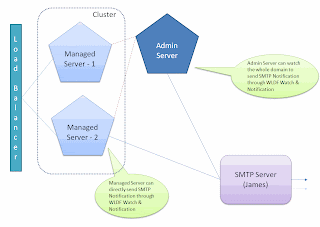
Figure: 1 WebLogic Domain


You can configure Watch conditions on the MBean data, Log messages and WLDF Event data. The notification can be one or more of the above notifications. Since email notification is a common request, I shall illustrate how to setup WLS to send email notification using an open source SMTP server - The Apache Java Enterprise Mail Server (Apache James). To download Apache James, go to - http://james.apache.org/server/ [or] http://people.apache.org/dist/james/server/binaries/. Download and extract the zip file to a convenient location (Eg. /usr/james-2.3.1rcl/). Start the server using run.sh from the bin folder under the JAMES_HOME. Setup a test user in James as per these instructions - http://james.apache.org/server/2.3.1/adding_users.html. The default admin username and password for James are root/root.

Ensure that the James mail server and the administration server for the domain are started. If not, use DOMAIN_HOME/startWebLogic.cmd/sh for starting the administration server of your domain and use JAMES_HOME/bin/run.bat/sh to start James Server. You can use console or WLST to configure the following setting. Let us use the web-based administration console for configuration. Log in to WebLogic Administration Console at - http://localhost:7001/console using an administrative account.

Creating JavaMail Session

First step is to make sure that the underlying resources for the notification are setup. In this case we are going to use SMTP notification so let us first create the Java Mail Session to connect to James Mail Server.

  1. Click "Lock & Edit" to acquire a configuration lock
  2. Expand Services > Mail Sessions and click "New" to create a new Java Mail Session.
  3. Provide Name, JNDI Name and JavaMail Properties as follow:
  4. Name - James-MailSession
  5. JNDI Name - com.test.myjamesMailSession
  6. JavaMail Properties:

mail.transport.protocol=smtp

mail.smtp.host=localhost

mail.smtp.user=admin

mail.smpt.password=password

  1. Click next to target the mail session to a server (Eg. AdminServer or mgd_s1) and click finish.
  2. Activate the changes by clicking "Activate Changes".


Figure: 2 Configuring JavaMail Session


If you are using a different mail server use appropriate information.

Creating WLDF Module

Next step in configuring watch and notification is to create a diagnostic module and target it to the server. You can use console or WLST to create a diagnostic module. The following steps illustrate the steps to create a WLDF system module:

  1. Click "Lock & Edit" to acquire a configuration lock
  2. Click Diagnostics > Diagnostics Modules and click "New" to create a new diagnostics module. Provide a name and description.
  3. Name - Test_WLDF_Module
  4. Description - This is a WLDF module for testing email notifications

  1. Select the newly created module and select targets tab. Select the appropriate server for target as before
  2. Click "Save" and "Activate"


Figure: 3 Configuring Diagnostic Module

Creating Watch & Notification

Each WebLogic Server instance can be configured with only one diagnostic module but you can target the same diagnostic module to multiple servers or clusters. Once the WLDF system module is created and targeted to the appropriate server then watches and notifications can be configured. The following steps illustrate how to create a Watch and a Notification.

To create a watch:

  1. Click "Lock & Edit" to acquire a configuration lock
  2. Navigate to the diagnostic module created above (Test_WLDF_Module) and select the "Watches and Notifications" tab and "Watches" sub-tab (if not already selected)
  3. Click "New" to create a new Watch. Provide the name and select the type as "Collected Metrics" [Select "Collected Metrics" for inspecting Runtime MBean values, "Server Log" to watch log data and "Event Data" to watch instrumented data]
  4. Name - Heap_Watch
  5. Watch Type - Collected Metrics
  6. Enable Watch - Selected
  7. Click "Next"
  8. Click "Add Expressions"
  9. Ensure that "ServerRuntime" is selected and click "Next"
  10. If you are running WebLogic Server on Java HotSpot VM, make sure "Select an MBean Type from the following list" is selected and select "weblogic.management.runtime.JVMRuntimeMBean" and click "Next". If you are using JRockit VM, make sure "Select an MBean Type from the following list" is selected and select "weblogic.management.runtime. JRockitRuntimeMBean" and click "Next".
  11. Select the instance for the appropriate server from the list for "Instance" and click "Next"
  12. For "Message Attribute" select "HeapFreePercent", "<" for "Operator" and type "85" for "Value". Click "Finish" twice to create a Watch
  13. Activate the changes


Figure: 4-a Configuring Watch


Figure: 4-b Configuring Watch


The above watch will trigger the configured notification if the percentage of free heap is less than 90. You could make complex rule expression by combining multiple attributes from different MBean. For now we haven't configured any notification for this watch. We will create the notification and will associate it to the watch in the following steps.

To create a notification:

  1. Click "Lock & Edit" to acquire a configuration lock
  2. Navigate to the diagnostic module created above and select the "Watches and Notifications" tab and "Notification" sub-tab
  3. Click "New" to create a new Notification
  4. Select "SMTP (E-Mail) for Type and click "Next"
  5. Provide a name - James_Email_Notification. Make sure the notification is enabled and click "Next".
  6. Configure the following properties for the "Config Notification - SMTP Properties" page
  7. Mail Session Name - James-MailSession
  8. E-Mail Recipients - admin@localhost

  1. Click "Finish".
  2. Activate the changes


Figure: 5-a Configuring SMTP Notification


Figure: 5-b Configuring SMTP Notification


To associate the watch and the notification:

  1. Click "Lock & Edit" to acquire a configuration lock
  2. Navigate to the diagnostic module created above (Test_WLDF_Module) and select the "Watches and Notifications" tab and "Watches" sub-tab (if not already selected)
  3. Select the watch you created earlier - Heap_Watch
  4. Select the "Notifications" tab and move the "James_Email_Notification" from Available to Chosen
  5. Click "Save"
  6. Select the "Alarms" tab and select "Use an automatic reset alarm". Set the "Automatic reset period" to 6 and click "Save". This will ensure that the notifications are at least 90 seconds apart.
  7. 5. Click "Activate Changes"

Figure: 6-a Associating Watch and Notification

Figure: 6-b Configuring Alarm

As we configured the watch type to be Collected Metrics, the attributes involved in the watch rule will be harvested and tested for watch rule expression(s). The default sampling period for the harvester is 300,000 milliseconds (or 5 minutes). So the time between samples will be 5 minutes. To change the sampling period for metrics collection:

  1. Click "Lock & Edit" to acquire a configuration lock
  2. Navigate to the diagnostic module created above (Test_WLDF_Module) and select the "Collected Metrics" tab
  3. Ensure that "Enabled' check-box is selected
  4. Change the "Sampling Period" as "120000" so that it will collect samples once every two minute


Figure: 7 Configuring Sampling Period


To receive the notifications sent by WebLogic Server as emails, install and configure an email client like Mozilla Thunderbird. The following is an example of the email received from WebLogic Server:

Using WLST

The configurations that are illustrated using Administration Console here can also be done using WLST. The following script is an example WLST script to configure a Javamail session, WLDF Module, Watch and Notification:


#Connect to the admin sever
connect('weblogic','Welcome1','t3://localhost:7001')

#Start a change session
edit()
startEdit()
cd('/')

#Create and configure a Javamail session
cmo.createMailSession('James-MailSession')
cd('/MailSessions/James-MailSession')
cmo.setJNDIName('com.test.myjamesMailSession')
cmo.setProperties({mail.smtp.user=user;, mail.smpt.password=password;, mail.smtp.host=localhost;, mail.transport.protocol=smtp;})
set('Targets',jarray.array([ObjectName('com.bea:Name=AdminServer,Type=Server')], ObjectName))

#Create and configure a WLDF Module
cd('/')
cmo.createWLDFSystemResource('Test_WLDF_Module')
cd('/SystemResources/Test_WLDF_Module')
cmo.setDescription('This is a WLDF module for testing email notifications.')
set('Targets',jarray.array([ObjectName('com.bea:Name=AdminServer,Type=Server')], ObjectName))

#Create and configure a WLDF Watch
cd('/WLDFSystemResources/Test_WLDF_Module/WLDFResource/Test_WLDF_Module/WatchNotification/Test_WLDF_Module')
cmo.createWatch('Heap_Watch')
cd('/WLDFSystemResources/Test_WLDF_Module/WLDFResource/Test_WLDF_Module/WatchNotification/Test_WLDF_Module/Watches/Heap_Watch')
cmo.setRuleType('Harvester')
cmo.setEnabled(true)
#For HotSpot VM
#cmo.setRuleExpression('(${ServerRuntime//[weblogic.management.runtime.JVMRuntimeMBean]com.bea:Name=AdminServer,ServerRuntime=AdminServer,Type=JVMRuntime//HeapFreePercent} < 85)')
#For JRockit VM
cmo.setRuleExpression('(${ServerRuntime//[weblogic.management.runtime.JRockitRuntimeMBean]com.bea:Name=AdminServer,ServerRuntime=AdminServer,Type=JRockitRuntimeMBean//HeapFreePercent} < 85)')
cmo.setAlarmType(None)

#Create and configure a WLDF SMTP Notification
cd('/WLDFSystemResources/Test_WLDF_Module/WLDFResource/Test_WLDF_Module/WatchNotification/Test_WLDF_Module')
cmo.createSMTPNotification('James_Email_Notification')
cd('/WLDFSystemResources/Test_WLDF_Module/WLDFResource/Test_WLDF_Module/WatchNotification/Test_WLDF_Module/SMTPNotifications/James_Email_Notification')
cmo.setEnabled(true)
cmo.setMailSessionJNDIName('com.test.myjamesMailSession')
set('Recipients',jarray.array([String('admin@localhost')], String))
cmo.setSubject(None)
cmo.setBody(None)

#Associate the watch and notification
cd('/WLDFSystemResources/Test_WLDF_Module/WLDFResource/Test_WLDF_Module/WatchNotification/Test_WLDF_Module/Watches/Heap_Watch')
set('Notifications',jarray.array([ObjectName('com.bea:Name=James_Email_Notification,Type=weblogic.diagnostics.descriptor.WLDFSMTPNotificationBean,Parent=[testdomain]/WLDFSystemResources[Test_WLDF_Module],Path=WLDFResource[Test_WLDF_Module]/WatchNotification[Test_WLDF_Module]/SMTPNotifications[James_Email_Notification]')], ObjectName))
cmo.setAlarmType('AutomaticReset')
cmo.setAlarmResetPeriod(60000)

#Set the sampling period
cd('/WLDFSystemResources/Test_WLDF_Module/WLDFResource/Test_WLDF_Module/Harvester/Test_WLDF_Module')
cmo.setSamplePeriod(120000)
cmo.setEnabled(true)

#Activate the changes
save()
activate()

#Exit
exit()

Thursday, July 1, 2010

Using WLST Script To List Messages From A JMS Queue

WebLogic Server added support for Runtime Message Management for Destination hosted on WebLogic JMS Servers in WLS 9.0. It will an exciting feature if you are currently in WLS 8.1 or new to WLS. Now you can administratively view and browse all messages, and manipulate most messages in a running JMS server, by using the Administration Console or WLS public runtime APIs. Once I start getting excited about this feature to customer the very next logical question from administrators are can I script this? The answer is obviously, Yes. Java or WLST is your answer. If you are a developer and there is a requirement to provide a Java/JEE application for your administrators or business users to view or browse the messages then Java will be your option. For administrators who are non-Java, there are MBeans like JMSDestinationRuntimeMBean and JMSDurableSubscriberRuntimeMBean that you can use from WLST to script any of the message managment features. Needless to say if there are existing Java implementation for message management then you can simply import and use them within WLST as well. But WLST scripts are natural choice for administrators.

So I started out writing a simple WLST script that can list all the messages from a given JMS Queue. The script is written to list all the headers and properties along with the body. I have made enough comments in the script to explain the different steps. But the high-level steps are:
  1. Connect to the server
  2. Get to the JMSDestinationRuntimeMBean
  3. Get the cursor to find the number of messages
  4. Get the messages without body to find the cursor and the Message ID
  5. Get the message with body using the Message ID
  6. Print the Headers, Properties and Body (or) Pay Load of the Message

A key information to note here is if you have any Object Messages in the Queue then those classes should be added to the Java Classpath before you execute this WLST Script. I haven't implemented any exception handling logic in my script whereas handling exceptions are best practices and you might want to refer to my other entries regarding that information.


#Import necessary classes/interfaces
from weblogic.jms.extensions import JMSMessageInfo
from javax.jms import TextMessage
from javax.jms import ObjectMessage

#Define constants
url='t3://localhost:7001'
username='weblogic'
password='weblogic1'
jmsservername='test-jms-server'
jmsmodulename='test-jms-module'
jmsdestname='test-queue'

#Connect
connect(username,password,url)

#Switch to the server runtime tree
serverRuntime()

#Navigate to the JMS Destination Runtime MBean
cd('JMSRuntime/' + serverName + '.jms/JMSServers/' + jmsservername)
cd('Destinations/' + jmsmodulename + '!' + jmsdestname)

#Get the cursor (JMSMessageCursorRuntimeMBean) to browse the messages - No selector & No time out
cursor = cmo.getMessages('',0)

#Determine the number of messages in the destination
cursorsize = cmo.getCursorSize(cursor)
print '------------------------------------------'
print 'Total Number of Messages -> ', cursorsize
print '------------------------------------------'

#Get all the messages as an array of javax.management.openmbean.CompositeData
messages = cmo.getNext(cursor, cursorsize)

#Loop through the array of messages to print
for message in messages:

#Create WebLogic JMSMessageInfo to get Message ID
jmsmsginfo = JMSMessageInfo(message)
wlmsg = jmsmsginfo.getMessage()
wlmsgid = wlmsg.getJMSMessageID()

#Get Message with body
fullcursormsg = cmo.getMessage(cursor,wlmsgid)
fulljmsmsginfo = JMSMessageInfo(fullcursormsg)
handle = fulljmsmsginfo.getHandle()
compdata = cmo.getMessage(cursor, handle)
msgwithbody = JMSMessageInfo(compdata)

#Print Key Message Headers
print 'Message ID - ' + msgwithbody.getMessage().getJMSMessageID()
print 'Message Priority -' , msgwithbody.getMessage().getJMSPriority()
if msgwithbody.getMessage().getJMSRedelivered() == 0:
redeliv = 'false'
else:
redeliv = 'true'
print 'Message Redelivered - ' + redeliv
print 'Message TimeStamp -' , msgwithbody.getMessage().getJMSTimestamp()
print 'Message DeliveryMode -' , msgwithbody.getMessage().getJMSDeliveryMode()

#Print Message Properties
prop_enum = msgwithbody.getMessage().getPropertyNames()
print ' '
print 'Message Properties :'
print ' '
for prop in prop_enum:
print prop + ' - > ' + msgwithbody.getMessage().getStringProperty(prop)

#Print Message Body
fullwlmsg = fulljmsmsginfo.getMessage()
print ' '
print 'Message Body :'
print ' '
if isinstance(fullwlmsg, TextMessage):
print fullwlmsg.getText()
else:
if isinstance(fullwlmsg, ObjectMessage):
print fullwlmsg.getObject()
else:
print '***Not a Text or Object Message***'
print fullwlmsg.toString()
print ' '
print '--------------------------------------------------------------'
print ' '

#Close cursor as No Time Out specified - Best practice
cmo.closeCursor(cursor)

#Disconnect & Exit
disconnect()
exit()

Wednesday, June 16, 2010

Running OS Commands From WLST


If you spend a lot of time with WLST in the interactive mode, I am sure you have opened another command prompt/shell to check something at the OS file system level. If you wonder whether can execute an OS command from within WLST prompt, the answer is "Yes". This is very convenient similar to how you can execute OS commands from within "Vi" editor.

In fact this feature is not from WLST but from underlying Jython. There is "os" module in Jython that provides a unified interface to a number of operating system functions. There is "system" function in the "os" module that can take a OS command as a string input and returns either "0" or "1" depends on whether the command was successful or failed. So this feature can also be used with scripting mode where the return code can be verified for further processing in the script.

For eg. os.system(r'dir c:\bea') can list the contents of the bea folder under c drive. Notice the use of the preceding 'r' for escaping the entire string.

Thursday, April 22, 2010

Effective HTTP Session Monitoring in WebLogic Server With monitoring-attribute-name

Monitoring HTTP Session on WebLogic Server is one of the common task for administrators when monitoring web applications for performance or for activity or usage. Web application modules deployed to WebLogic Server maintains a "monitoring ID", which although looks like a session ID is not the same as the real session ID. You can use the monitoring id to identify the session uniquely. Monitoring IDs are not same as session IDs for security reason. You can turn on session debugging which prints session IDs to the log but these will not match what you see in the console/WLST. Monitoring ids are randomly generated by default. You can set a value to this monitoring id through a session attribute using "monitoring-attribute-name" element in session-descriptor of the weblogic.xml. This can simplify the task of monitoring sessions for administrators in production environment.

For e.g. if you set the "monitoring-attribute-name" to be "user-name" then it will use the string value of the session attribute named "user-name" as the value for Monitoring ID instead of the randomly generated value. When getMonitoringID(sessionid) method is called on the ServletSession, it will return session.getAttribute("user-name").toString().


weblogic.xml
-------------
...

600
user-name


true

...


So if you have an attribute within the HTTP Session which can identify the user/session uniquely then you can use that as the monitoring id. This is the recommended approach to track/monitor sessions instead of the session id which is an internal attribute. If you don't set the monitoring-attribute-name, WLS will randomly generate a monitoring id for each session. When developers set the monitoring-attribute-name, this will help administrator to associate sessions to the actual users.

Sample WLST script to get all the monitoring ids (for the respective session) as an array:


...
AppName = 'MedRecEar'
TargetServerName = 'MedRecSvr1'
WebCompName = 'MedRecWar'
serverRuntime()
cd('ApplicationRuntimes/' + AppName + '/ComponentRuntimes/' + TargetServerName + '_/' + WebCompName) MIDs = mon_ids = cmo.getServletSessionsMonitoringIds()
...


In the above example, the variable mon_ids will contain an array of monitoring ids as strings. Using these monitoring ids information about the individual session can be obtained from other operations like:
- getSessionLastAccessedTime
- getSessionMaxInactiveInterval

One can even invalidate the session using the following opertion:
- invalidateServletSession

This will give an option for administrators to cleanup or delete stale sessions if there are any. These are the only information that are exposed for sessions unless you want to use the deprecated ServletSessionRuntimeMBeans. This is an old MBean that has more methods/operations. Admin console doesn't expose the session id for security reason. If you need access to all the session ids for some reason then you have to use this deprecated ServletSessionRuntimeMBeans. You can get all the ServletSessionRuntimeMBeans as an array from a WebAppComponentRuntimeMBean using a deprecated getServletSessions() method. WLST script to access the above mentioned deprecated ServletSessionRuntimeMBeans:


...
AppName = 'MedRecEar'
TargetServerName = 'MedRecSvr1'
WebCompName = 'MedRecWar'
serverRuntime()
cd('ApplicationRuntimes/' + AppName + '/ComponentRuntimes/' + TargetServerName + '_/' + WebCompName + '/ServletSessions')
ls()
....


The above ls() command will list you all the sessions with session id as their name. Even though this post has lot of information on how to monitor sessions and make use of the monitoring-attribute-name, I shall write another to provide a complete example of how to use this.

Also see my other post on how to monitor HTTP sessions from the administration console and WLST.

Wednesday, April 21, 2010

User Lockout & WLST

WebLogic server provides an option to lockout users to protect accounts from password guessing attack. It is implemented with a realm-wide Lockout Manager. This feature can be used with custom authentication provider also. But if you implement your own authentication provider and wish to implement your own lockout manager that is possible too.

If your domain is configured to use the user lockout manager the following WLST script will help you to:
- check whether a user is locked using a WLST script
- find out the number of locked users in the realm


#Define constants
url='t3://localhost:7001'
username='weblogic'
password='weblogic'
checkuser='test-deployer'

#Connect
connect(username,password,url)

#Get Lockout Manager Runtime
serverRuntime()
dr = cmo.getServerSecurityRuntime().getDefaultRealmRuntime()
ulmr = dr.getUserLockoutManagerRuntime()

print '-------------------------------------------'
#Check whether a user is locked
if (ulmr.isLockedOut(checkuser) == 0):
islocked = 'NOT locked'
else:
islocked = 'locked'
print 'User ' + checkuser + ' is ' + islocked

#Print number of locked users
print 'No. of locked user -> ', Integer(ulmr.getUserLockoutTotalCount())

print '-------------------------------------------'
print ''

#Disconnect & Exit
disconnect()
exit()

Friday, February 26, 2010

WLDF Browser

WebLogic Diagnostic Framework (WLDF) is a comprehensive framework for diagnosing isuees related to servers, applications, services in WebLogic Server. Image capturing is a component of WLDF which can be used to get a snapshot of all the key information from a server. The WLDF Image gets generated as a zip file with an "img" file for information from each sub-system. For more information regarding WLDF Image capturing refer to the WLS documentation here.

Currently there are no official tools available to view the image or to compare 2 or more images. The attached tool WLDF Browser can help you to view the diagnostic image.

HTTP Session Monitoring in WebLogic Server

Monitoring HTTP sessions on WebLogic Server is a common task when you have web component (WAR) deployed as a part of your enterprise application (EAR). By default WebLogic Server provides a way to access the number of active HTTP sessions for each web application. But if you need more information about the individual sessions like their creation time, last accessed time, maximum inactive interval etc. then you have to enable the session monitoring option in the web component's Deployment Descriptor (DD). If the application is already packaged and deployed you can make use of the deployment plan to enable this attribute. WebLogic Administration Console provide options to modify some of the attribute for the components and application through the interface. Eventually a deployment plan will be generated if there are no deployment plan associated with the application or the existing plan will be modified automatically by Administration Console. This will ease administrators job of enabling session monitoring for a packaged application. You may have to update or redeploy the application with the plan for the monitoring to take effect. No restarting of any server is required for this change.

Administration Console will automatically populate the Session tab under the Monitoring tab with the individual session information for the specific application. By default the following column are displayed on the console page:

  • Context Root
  • Server
  • Creation Time
  • Time Last Accessed
  • Max Inactive Interval

You can also add the following columns to the table by customizing the view:

  • Monitoring ID
  • Application
  • Machine

The Monitoring ID provides a unique ID by default to identify the session. You can also customize the Monitoring ID by specifying a session attribute name which is unique for identifying the session for users. For example you can configure customer_id or user_id or order_id as Monitoring ID for tracking session. I shall talk about Monitoring IDs and finding session size in a different post. Internally WebLogic will concatenate the Monitoring ID with the creation time to make a unique name for each session. The following is an example screen shot of monitoring sessions after customizing the view:


WLST can also be able to retrieve these information from the ServletSessionRuntimeMBeans. The following is an example WLST script to connect to the Administration Server of a domain to retrieve session information for a specific application on a particular server.I had used the deprecated ServletSessionRuntimeMBeans in my WLST example as the session creation time is only available through that runtime mbean. You can also access all the information about the session except the creation time through the WebAppComponentRuntimeMBean. But you will have to use the Monitoring IDs (available through WebAppComponentRuntimeMBean) to get information about a specific session.


from java.util import Calendar

def defineVariables()
#Define all the variables used
username='system'
password='weblogic'
adminurl='t3://localhost:7001'
servername='AdminServer'
appname='CompanyStore'

def connectToAdminServer()
#Connect to Admin Server
connect(username,password,adminurl)

def extractAndPrintSessionInfo(servletSessionRuntime)
#Get session name
session_name=ssession.getName().split('!')[0]
#Creation time is concatinated to the session name. So split it
ct_millis=ssession.getName().split('!')[1]
cal = Calendar.getInstance()
cal.setTimeInMillis(Long(ct_millis))
ct = cal.getTime()
#Get last accessed time
tla_millis=ssession.getTimeLastAccessed()
cal.setTimeInMillis(Long(tla_millis))
tla = cal.getTime()
print ' '
print 'Session Name - ' + session_name
print 'Creation Time - ', ct
print 'Last Accessed Time - ', tla

#Main
defineVariables()
connectToAdminServer()

#Get Runtime for our server
domainRuntime()
cd('/ServerRuntimes/'+servername)

#Get all running applications
apps=cmo.getApplicationRuntimes()
for app in apps:

#We are intersted only on this application
if app.getName() == appname:

print 'Application Name - ', app.getName()

#Get all components in that application
comps=app.getComponentRuntimes()
for comp in comps:

#We are interested in only web components
if comp.getType() == 'WebAppComponentRuntime':
comp_name = comp.getName().split(servername+'_/')
if len(comp_name) == 1:
display_comp_name = '(default web app)'
else:
display_comp_name = comp_name
print 'Component Context Root - ', display_comp_name

#Get all active sessions
sessions=comp.getServletSessions()
print 'Total no. of sessions - ', len(sessions)

#Loop through all the available sessions
for ssession in sessions:
extractAndPrintSessionInfo(session)

#Disconnect and exit
disconnect()
exit()


The output from the above script will look something like this:


[test@mywlssvr-orcl ~]$ java weblogic.WLST sessions.py

Initializing WebLogic Scripting Tool (WLST) ...

Welcome to WebLogic Server Administration Scripting Shell

Type help() for help on available commands

Connecting to t3://localhost:7001 with userid system ...
Successfully connected to Admin Server 'AdminServer' that belongs to domain 'dizzyworld'.

Warning: An insecure protocol was used to connect to the
server. To ensure on-the-wire security, the SSL port or
Admin port should be used instead.

Location changed to domainRuntime tree. This is a read-only tree with DomainMBean as the root.
For more help, use help(domainRuntime)

Application Name - CompanyStore
Component Context Root - (default web app)
Total no. of sessions - 2

Session Name - dYvLLHgRGxQ8zS0ZYySLZKx1j2KK9Ws2G22nlJXvrQRFv64zsPTm
Creation Time - Fri Feb 26 01:13:21 UTC 2010
Last Accessed Time - Fri Feb 26 01:13:26 UTC 2010

Session Name - nGbTLHgFLnfNjwGT1cpHGQhJZGZynBYRsp2TjC8kC7KFRK1vCCf3
Creation Time - Fri Feb 26 01:13:41 UTC 2010
Last Accessed Time - Fri Feb 26 01:13:45 UTC 2010
Disconnected from weblogic server: AdminServer


Exiting WebLogic Scripting Tool.

Saturday, January 23, 2010

Node Manager as a UNIX Startup Process

Configuring WebLogic Server (WLS) as a startup process was a common administrative process in the past. But after Node Manager (NM) was introduced as an agent to start, stop, restart and monitor WebLogic Server it is now recommended that you start WebLogic Server using NM. But NM has to configured as a startup process on the respective OS so that it is always running to manage the respective WLS instances on that machine. NM can either be Java based NM or Script based NM. Script based NM uses OS services like SSH or RSH to execute the NM script. But Java based NM is a Java process that should be started. So setting up NM as a service will ensure that NM is always running. There is a lot of information in the WebLogic Server documentation about setting up NM. But there is very less or no information about setting NM as a service on a non-Windows environment. For Windows environment there are pre-packged scripts that you can use. These scripts exists under WL_HOME/server/bin folder (installNodeMgrSvc.cmd, uninstallNodeMgrSvc.cmd). But for UNIX based environment you should do this manually or with the help of OS specific utilities like chkconfig etc.

For *nix environment NM should be configured as startup process using rc scripts. Creating rc scripts for configuring NM as a service is even simpler than configuring WebLogic Server as a service. This is mainly because NM doesn't have to be shutdown gracefully. All you have to do is write a simple shell script that starts the NM and create the symbolic link to that script from the right run level folder. The following illustrates the steps to confiure NM as service under LINUX environment. It should be very similar on other *nix environments. You need root permission to peform the following steps.


1. Create a shell script (wlsnmd) under /etc/init.d/ folder:


#! /bin/bash
case "$1" in
start)
WL_HOME = /usr/middleware/11.1.0/wlserver_10.3
$WL_HOME/server/bin/startNodeManager.sh
;;

*)
echo "Usage: $0 {start}"
exit 1
esac

exit_status


2. Assuming that we are going to start NM at run level 5, create a sysmbolic link in /etc/rc.d/rc5.d/ folder. Since it a startup script we should start the symbolic link with "S" and followed by a number which decide the order in which services will be called. As we are fine to start NM after all the other application/services are start let us choose 99 which is the highest number.


ln -s /etc/init.d/wlsnmd S99weblogic


If you don't want to do these manually you can also use utilities like chkconfig (included in Red Hat distributions) for managing your startup scripts. For configuring WebLogic Server as a startup process there are pre-packaged scripts (installSvc.cmd, uninstallSvc.cmd). But you have to create rc scripts similarly for WLS as well in UNIX based environments. Here is an example rc script for configuring a WebLogic Server as a startup process. But here we also need to implement the kill/stop to gracefully shutdown the server.


#! /bin/bash

case "$1" in
start|reload)
DOMAIN_HOME = /usr/middleware/domains/med_analysis
$DOMAIN_HOME/bin/startWebLogic.sh
;;
stop)
$DOMAIN_HOME/bin/stopWebLogic.sh
;;
restart|force-reload)
$0 stop
$0 start
;;
*)
echo "Usage: $0 {start|stop|restart}"
exit 1
esac

exit_status

Wednesday, November 25, 2009

Understanding WLST built-in variables . . .[WLST scripting Best Practices (Part-5)]

This post is a continuation of my previous post - in a series of posts about WLST scripting best practices.

Managed Beans (MBeans) are used to represent all the configuration and runtime information about WebLogic Domain, Servers, the applications and services deployed on a WebLogic Server Domain. While you can get all the information from WebLogic MBeans, WLST simplifies the task of building scripts by providing some built-in variables. These WLST variables are initialized and/or modified when you change to online mode (connect to a server), start an edit session etc. to appropriate values.

One of the very useful WLST variable is cmo. cmo stands for current management object. When navigating in WLST you can use cmo to reference the current MBean (object) instance you are navigating into. The cmo value is changed when you navigate to different hierarchy of MBeans under different MBean trees in WebLogic (except jndi tree). The following illustrates the use of cmo.


...
connect(username, password, url)
edit()
startEdit()
cd('/Servers/server1')
s1=cmo
cd('/Servers/server2')
s2=cmo
print 'Listenport of server1 -> ' + s1.getListenPort()
print 'Listenport of server2 -> ' + s2.getListenPort()
...


Notice the use of cmo can for invoking operations on the respective MBean object. There are many such variables that will help you to write better and efficient WLST scripts. See here for the list of all the WLST variables.

If you know a variable name you can simply use it in you script. dumpVariables() command can be used to list all the variables and their values.


wls:/testdomain/serverConfig> dumpVariables()
adminHome weblogic.rmi.internal.BasicRemoteRef - hostID: '328889774891021637S:127.0.0.1:[7001,7001,-1,-1,-1,-1,-1]:testdomain:AdminServer',oid: '259', channel: 'null'
cmgr [MBeanServerInvocationHandler]com.bea:Name=ConfigurationManager,Type=weblogic.management.mbeanservers.edit.ConfigurationManagerMBean
cmo [MBeanServerInvocationHandler]com.bea:Name=testdomain,Type=Domain
connected true
domainName testdomain
...


In addition you should also be aware of these WLST variables in order to NOT use them to store your own information. If you do so then WLST will overwrite these variables during your interaction like connect, startEdit etc. So make sure you understand these WLST variables, use them in your scripts and do not use them to store your information.

Monday, November 23, 2009

Force confidentiality for Web Applications

Usually there are requirements for web based applications to use SSL when serving sensitive data between the client browser and WebLogic server. You can enable SSL port for WebLogic Server and disable the plain text port. This will force all the communication through the SSL port enabled on the target server. But if you have a mix of applications that require secured access and that doesn't then you can use the standard JEE web application descriptor to enable confidentiality. If you enable trasport guarantee configuration for the Web Applications, WebLogic Server will force the application or selective URL patternts to be accessed through the SSL port on WebLogic Server.

The following shows an example of transport guaranetee entry from web.xml:


...


CONFIDENTIAL


/*


...


Even if the client is accessing through plain text port, WLS container will automatically redirect the request to the SSL port if enabled or to any other Network Channel enabled with SSL. This will ensure that certain applications or requests to be always accessed through SSL. Setting the transport guarantee to be NONE will relax the requirements and will not force SSL for the applications. But if there are SSL enabled network channels or SSL port is enabled on the server then the application can still be accessed using SSL. If the value for transport guarantee is set to be INTEGRAL then the requirement is that the data sent between the client and server be sent in such a way that it can't be changed in transit.

Needless to say that this configuration can also be configured through deployment plans. If the application you are deploying on WebLogic Server is already packaged for deployment or third-party application then deployment plan will solve the purpose of overriding the application's configuration through external means. See here for more information on deployment plans with WebLogic Server.

Thursday, October 22, 2009

More ways to check the existense of a resource with WLST

In one of my previous post, I discussed a couple of ways with which you can find out whether a particular configuration already exists before you create them. The methods are not just limited to the one on that post. So now I am here to discuss couple more way to do the same check. But just for completeness I shall also include the methods I discussed in my previous post. I am taking a sample use case to check whether a particular WebLogic Server instance exists in the domain or not. But you can extrapolate these technique for any other resource like JDBC Data Source, JMS Server, JMS Queue etc.

Goal - Check whether a server with the name 'mymanagedserver' exists in the domain

Method-1 Using "cd"

A simple approach is to use the "cd" command to navigate into that configuration MBean. If the "cd" command throws an exception then you can safely assume that the resource/configuration doesn't exists and you can continue with your task.


...
mgdServerName = 'mymanagedserver'
### Checking for the server
try:
cd('/Servers/' + mgdServerName)
print '===> Server \"' +mgdServerName+'\" already exists'
print '===> No action was performed'
exit()
except:
pass
### Continue to create the server
...


Method-2 Catch "BeanAlreadyExistsException"

Another approach is to catch the "BeanAlreadyExistsException" when creating the resource and safely exiting the script.


...
mgdServerName = 'mymanagedserver'
### Create the Managed Server
edit()
startEdit()
try:
create(mgdServerName, resourceType)
print '===> Created Managed Server - ' + mgdServerName
pass
except BeanAlreadyExistsException:
print '===> Server \"' +mgdServerName+'\" already exists'
print '===> No action was performed'
cancelEdit('y')
exit()
...


But with this approach you are starting an edit session and creating the server to find out it's existence. So you have to cancel the edit session once you find out that the resource that you are creating already exists if not you might get a warning message similar to the following:

You have an edit session open and you will lose all outstanding changes and your edit session will be stopped if you exit. Are you sure you would like to exit? (y/n)

So canceling the edit session with a response 'y' will make WLST not to prompt for the user response.


Method-3
Using "getMBean"

There is a WLST command called getMBean which will return the MBean object when you specify the appropriate path. If the instance is not found then it will return None. But getMBean command does not throw an exception when an instance is not found. So you have explicitly check result of the getMBean.


...
mgdServerName = 'mymanagedserver'
ref = getMBean('/Servers/' + mgdServerName)
if(ref != None):
print 'Server ' + servername + 'already exists'
disconnect()
exit()
else:
pass
### Continue to create the server
...


Method-4 Using "ls"

You can simply navigate to the resource type and execute ls. This will return the list of all the instances as a string when you assign the output to a variable. Then you can use the find method on that string variable to check whether your server exists. The find method returns a "0" on success or "-1" on failure.


...
mgdServerName = 'mymanagedserver'
cd('/Servers')
servers = ls()
if (servers.find(servername) != -1):
print 'Server ' + servername + ' already exists'
disconnect()
exit()
else:
pass
### Continue to create the server
...

Wednesday, September 16, 2009

Don't want to get prompted for confirmation in WebLgic Console?

If you are using WebLogic Admin console frequently to configure resources or to manage the life cycle of the servers, you might have seen a confirmation prompt. This prompt will show not up when you are running the domain in development mode. When the domain is running in production mode they will ask confirmation for all the operations. There used to be no way to disable this confirmation page prior WebLogic Server 10.3. Now in WebLogic Server 10.3 and higher you can set a console user preference that can disable these confirmation pages.

Use the tool bar at the center (top) of the console to go to the "Preferences". Under the "User Preferences" tab you will find an option called "Ask for confirmation in operations". By default it will be enabled in production domains and you can disable it to avoid that annoying confirmation pages where will have to click either "Yes" or "No". While you are there explore the other useful preferences like "Show Inline Help" and "Show Advanced Sections" which can buy some real-estate space in the console and save you some clicks.


Friday, August 28, 2009

Change in WebLogic Server HTTP Session Failover Logic With Proxy Plug-ins

When using HTTP Sessions with WebLogic Cluster, you can ensure high availability for your session by configuring HTTP Session Replication. For the replication strategy, you have many options to select from like In-memory, file, JDBC, Cookie etc. When you are using in-memory replication with a web server to front WebLogic Server Cluster, the proxy plug-in must be configured on the web servers. The proxy plug-ins are intelligent enough to stick the request from a client to the same server where the session is hosted. A secondary copy of the session will be sent to a backup server by the primary server. This information will be written to a cookie or encoded in the URL depending on the client's configuration to support cookies.


In the past, during failure of the primary server, the proxy plug-in on the web server will redirect the request to the secondary/backup server. This resulted in increased traffic to the secondary/backup server. So somewhere during the Weblogic Server 9.x the plug-ins are updated to do a random routing incase of failures. The proxy server will randomly distribute all the requests from the failed server to different servers that are still running in the cluster. When the request from the existing clients (with valid session id) gets redirected to servers that are not secondary server then that server will connect to the secondary server for that client and will pull the session to become primary server. This ensures that one server will not get overloaded when a server in a cluster fails.


The same exact strategy was used when you front a WebLogic cluster with a load balancing hardware as not all the load balancing hardware understand the WebLogic cluster configuration. Now the same strategy is applied to the WebLogic Cluster front by a proxy plug-in hosted on a web server. This make the failover strategy consistent whether you have hardware or a software based proxy in front a WebLogic Cluster.

WebLogic Server documentation is still not updated to reflect this change under the "Proxy Failover Procedure" section. If you are running WebLogic Cluster with 9.x and you are not seeing this behavior then you can contact Oracle Support to find out whether there is a patch that can you can apply for your current WebLogic implementation.